Ghibli AI Generator Free: 5 Best Tools to Create Studio Ghibli Style Art in 2026
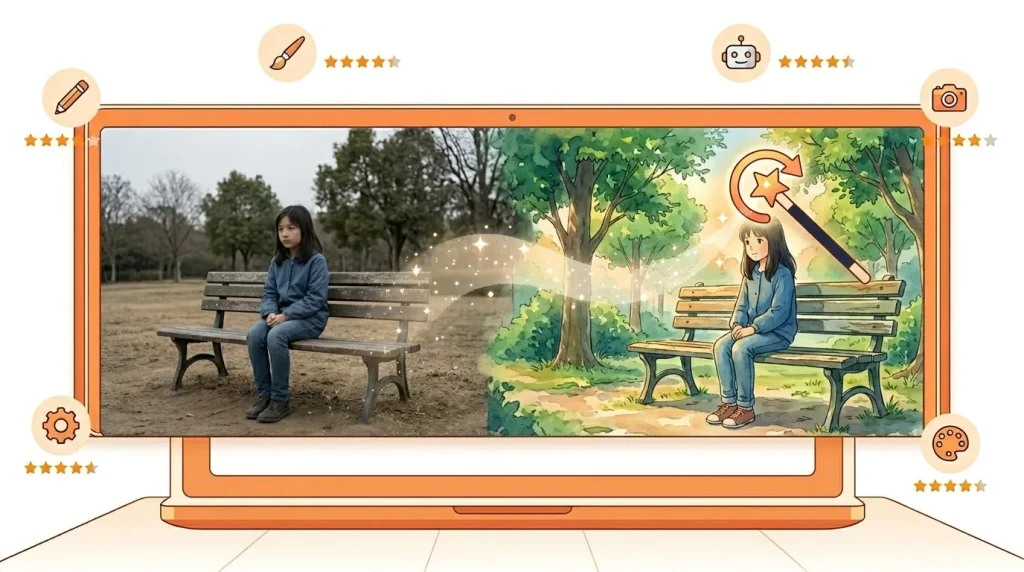
You saw the photos flooding TikTok and Instagram — ordinary people, pets, and living rooms transformed into magical hand-painted animation scenes. Now you want to try it. But here’s the frustrating part: most tools charge a subscription fee, add ugly watermarks, or quietly hide the “free” option three pages deep.
Good news. These ghibli ai generator free tools actually work — no credit card, no hidden fees, and no watermark on your first images. In this guide, you will get direct links to the five best options, a step-by-step tutorial to get the best results, and the exact prompt formulas that create authentic studio ghibli style art — not cheap imitations.
What Is a Ghibli AI Generator Free?
A Ghibli AI generator is an AI image tool trained to recreate the visual style of Studio Ghibli films. Think Spirited Away, My Neighbor Totoro, and Princess Mononoke — that unmistakable hand-painted, dreamlike quality.
How Ghibli AI Tools Work
These tools use large image generation models — like Stable Diffusion or DALL·E 3 — trained on millions of images. When you upload a photo or type a prompt, the AI processes your input and returns an image in the Ghibli aesthetic. Some tools do this in seconds. Others take a minute or two.
Most free tools work directly in your browser. Therefore, you do not need to download any software or have a powerful computer.
Why the Ghibli AI Trend Exploded in 2026
In early 2025, ChatGPT released an image update that could transform photos into Ghibli-style art. Within days, the trend went viral — millions of people shared their transformations online. However, ChatGPT required a paid Plus subscription for high-quality results.
As a result, people started searching for free alternatives. That search volume has stayed high ever since, which is exactly why you are here.
Top 5 Ghibli AI Generator Free Tools (Tested in 2026)
These five tools were tested specifically for Ghibli-style output quality, free tier limits, and whether they actually remove watermarks on free downloads. Here is what the testing found.
#1: Leonardo AI — Best Overall Free Ghibli Generator
Free credits: ~150 tokens per day
Watermark on free: No
Account required: Yes (free signup)
Commercial use: Yes, with conditions
Ghibli quality rating: ⭐⭐⭐⭐ (4/5)
Leonardo AI is the strongest all-around free option in 2026. The free plan gives you enough daily tokens to generate 10–20 images, which is generous compared to most competitors. More importantly, it does not stamp a watermark on free downloads.
The interface is beginner-friendly. You simply choose a model, type your prompt, and hit generate. For Ghibli results, the “DreamShaper” or “AlbedoBase XL” models produce the most painterly output.
Most of these tools also have Android apps — see our full list of best free AI apps for Android for the complete mobile setup.
Best prompt for Leonardo AI:
A young girl walking through a lush mossy forest path, hand-drawn cel animation style, soft watercolor background, warm golden hour light, visible brushstrokes, nostalgic 1990s anime film still, highly detailed, cinematic wide shot
Main drawback: Free generations are public by default. Go to settings and switch to “Private” mode if you want your images hidden.
#2: Tensor.art — Best for Authentic Ghibli Results
Free credits: Daily credits included
Watermark on free: No
Account required: Yes
Commercial use: Check per model
Ghibli quality rating: ⭐⭐⭐⭐⭐ (4.5/5)
Tensor.art is the closest free tool to what a professional animator would produce. It runs on Stable Diffusion and lets you load specific Ghibli-inspired models and LoRAs — which are style-specific fine-tunings that dramatically improve accuracy.
However, it does require slightly more prompt knowledge than other tools on this list. If you are new to AI image generation, therefore, start with Leonardo AI first and come back to Tensor.art once you are comfortable.
Best prompt for Tensor.art:
Soft watercolor painting of a coastal fishing village at dusk, hand-painted anime background, warm amber sky, gentle waves, small wooden boats, detailed architecture, gouache texture, Studio Ghibli inspired
#3: Adobe Firefly — Best for Commercial-Safe Images
Free credits: Limited monthly credits
Watermark on free: No
Account required: Yes (free Adobe account)
Commercial use: Yes
Ghibli quality rating: ⭐⭐⭐⭐ (3.5/5)
If you plan to use your Ghibli-style images for a blog, YouTube thumbnail, or small business social post, Adobe Firefly is the safest choice. Adobe trains Firefly only on licensed content, which means the outputs are commercially safe.
The Ghibli results are not as painterly as Leonardo or Tensor.art. On the other hand, the images are clean, professional, and ready to use without any legal concerns.
Adobe Firefly works for much more than Ghibli art — it is one of the top free AI tools for content creators across writing, design and video.
Best prompt for Adobe Firefly:
Painterly watercolor background, hand-drawn animation feel, soft natural lighting, whimsical forest village at sunrise, highly detailed, warm pastel color palette
#4: Bing Image Creator (Microsoft Copilot) — Best for No-Signup Quick Results
Free credits: ~15 boosted generations per week
Watermark on free: No visible watermark
Account required: Microsoft account (most people already have one)
Commercial use: Not clearly safe on free tier
Ghibli quality rating: ⭐⭐⭐ (3.5/5)
Bing Image Creator is the fastest way to get started because most people already have a Microsoft account. You simply visit bing.com/images/create, log in, and start generating immediately.
The Ghibli results are decent — not the most authentic, but good enough for social media and personal use. Meanwhile, the weekly boost limit resets automatically, so it works well as a backup tool when your Leonardo or Tensor.art credits run out.
Best prompt for Bing Image Creator:
Studio Ghibli inspired, hand-painted background, soft watercolor sky, warm sunlight filtering through trees, detailed countryside landscape, gentle cinematic framing, 1990s anime film aesthetic
#5: Ideogram — Best Free Tool for Clean, Shareable Images
Free credits: ~10 generations per day
Watermark on free: No
Account required: Yes
Commercial use: Yes
Ghibli quality rating: ⭐⭐⭐ (3.5/5)
Ideogram is newer than the others, but it produces particularly clean and shareable results. The compositions are well-balanced and the color palettes are warm — both of which are essential for capturing the Ghibli feel.
Additionally, Ideogram allows commercial use on its free tier, which makes it one of the few tools where you can generate and immediately use the image for your blog or content without upgrading.
Comparison Table: Which Free Ghibli AI Generator Is Right for You?
| Tool | Free Daily Limit | Watermark | Account Needed | Commercial Use | Ghibli Quality | Best For |
|---|---|---|---|---|---|---|
| Leonardo AI | ~150 tokens | ❌ No | ✅ Yes | ✅ Yes | ⭐⭐⭐⭐ | Best overall free option |
| Tensor.art | Daily credits | ❌ No | ✅ Yes | ⚠️ Check model | ⭐⭐⭐⭐⭐ | Most authentic Ghibli look |
| Adobe Firefly | Monthly credits | ❌ No | ✅ Yes | ✅ Yes | ⭐⭐⭐½ | Commercial & blog use |
| Bing Image Creator | ~15/week | ❌ No | ✅ Microsoft | ⚠️ Unclear | ⭐⭐⭐½ | Fastest, no new account |
| Ideogram | ~10/day | ❌ No | ✅ Yes | ✅ Yes | ⭐⭐⭐½ | Clean, shareable images |
What Is Studio Ghibli Style Art? (The Complete Guide)
Before you start generating, it helps to understand what you are actually trying to recreate. Studio Ghibli style art is not simply “anime” — it has very specific visual characteristics that separate it from every other animation studio in the world.
Key Visual Characteristics of Ghibli Art
Ghibli films are defined by a few consistent visual choices:
- Soft pastel color palettes with warm amber, forest green, and sky blue tones
- Painterly backgrounds that look hand-crafted, not digital
- Watercolor and gouache textures that give backgrounds a tactile quality
- Golden hour lighting — warm, directional light filtering through trees or windows
- Detailed natural environments — moss, water, wind in the grass
- Quiet, emotional compositions — wide shots that let the scenery breathe
The biggest difference from other anime styles is the background treatment. Most anime uses flat, digital-looking backgrounds. Ghibli backgrounds, by contrast, look like oil paintings. They are detailed and atmospheric rather than sharp and clean.
Color Palettes and Composition Secrets
Ghibli films consistently use warm, natural tones. Reds are earthy. Blues are soft. Greens lean toward olive and sage rather than neon. In your AI prompts, therefore, specify colors like “warm amber sky,” “soft sage green,” and “dusty rose” rather than simply “colorful.”
For composition, Ghibli scenes use a lot of open space. Characters are often small within large, detailed environments. Adding “cinematic wide shot” and “environmental storytelling” to your prompts pushes AI tools toward this style effectively.
Hayao Miyazaki’s Stance on AI Art
It is worth addressing this honestly, because a lot of people ask about it. Hayao Miyazaki — the director and co-founder of Studio Ghibli — has publicly called AI-generated art “an insult to life itself.” He has stated that he finds it deeply distressing to see AI attempt to recreate human emotion without genuine experience.
This does not make using these tools illegal. Style is not protected by copyright law. However, it is worth knowing the context behind the trend you are participating in.
Step-by-Step Tutorial: Create Your First Ghibli Style Image
Here is exactly how to generate your first high-quality Ghibli image using Leonardo AI — the recommended starting point for beginners.
Step 1: Create a Free Leonardo AI Account
Go to leonardo.ai and click “Get Started Free.” Sign up with your email or Google account. The process takes under two minutes.
Step 2: Choose the Right Model
Once inside, click “Image Generation” in the left sidebar. Then click the model dropdown at the top and select “DreamShaper v7” or “AlbedoBase XL.” These models produce the warmest, most painterly results for Ghibli style.
Step 3: Write Your Prompt Using the Ghibli Formula
Use this formula for consistent results:
[Subject] + [Setting] + [Lighting] + [Art Style Keywords] + [Mood]
Example:
A small girl in a red dress standing at the edge of a sunlit meadow, hand-drawn cel animation style, soft watercolor background, warm golden afternoon light, visible brushstrokes, nostalgic anime film still, highly detailed, cinematic wide shot, whimsical mood
Step 4: Adjust the Settings
Before hitting generate, set these options:
- Width: 1024px
- Height: 768px (landscape) or 768×1024 (portrait)
- Guidance Scale: 7–8 (keeps results close to your prompt)
- Steps: 30–40 (higher = more detail, slower)
Step 5: Generate and Refine
Click generate and wait 10–20 seconds. If the result is too saturated, add “soft muted tones” to your prompt. If it looks too sharp and digital, add “visible brushstrokes, hand-painted texture, analog grain.”
Download your image — no watermark on the free tier.
Before and After: What These Tools Actually Produce
The most important thing to know is that results vary significantly based on your prompt quality, not just the tool.
A weak prompt like “ghibli style forest” produces generic, flat results. However, a detailed prompt like the formula above produces images that genuinely capture the warm, painterly, hand-crafted quality of Ghibli films.
The difference is almost entirely in how you write the prompt — which is why the next section is the most valuable part of this entire guide.
Best Prompts for Studio Ghibli Style Art
These prompts are tested and copy-paste ready. Each one targets a different scene type. Simply swap out the specific details (location, character, time of day) to customize.
10 Copy-Paste Prompts That Work
1. Countryside landscape:
Rolling green hills with a small farmhouse in the distance, hand-drawn cel animation style, soft watercolor sky, warm golden hour light, wildflowers in the foreground, nostalgic anime film still
2. Forest path:
A moss-covered forest path dappled with soft afternoon light, hand-painted anime background, ancient trees with twisted roots, small mushrooms along the path, gouache texture, studio ghibli style art
3. Coastal village:
A quiet fishing village at dawn, wooden boats in a calm harbor, soft pink and orange sky, hand-painted watercolor background, gentle mist, cinematic wide shot
4. Cozy interior:
A cluttered but cozy bedroom with warm lamplight, books stacked on wooden shelves, a small window showing a rainy street, hand-drawn cel animation style, warm amber tones
5. Train journey:
A vintage steam train traveling through autumn countryside, orange and red maple trees, soft misty mountains in the background, hand-painted anime style, nostalgic film still
6. City at night:
A cobblestone street in a small town at night, warm light spilling from shop windows, rain-wet streets reflecting lantern light, hand-drawn animation style, cozy atmosphere
7. Spirit creature:
A small white spirit creature sitting in a forest clearing, large round eyes, soft glowing aura, surrounded by fireflies, hand-painted watercolor style, whimsical mood
8. Mountain peak:
A young adventurer standing on a mountain peak at sunrise, hand-drawn animation style, vast landscape below, soft gradient sky from deep blue to warm gold, cinematic composition
9. Garden scene:
An overgrown secret garden with a stone fountain, wildflowers growing between cobblestones, soft morning light, hand-painted anime background, peaceful atmosphere
10. Seaside cliff:
A girl standing on a seaside cliff overlooking the ocean, strong wind in her hair, soft watercolor sky, dramatic clouds, studio ghibli style art, emotional cinematic framing
The Universal Prompt Formula
For any scene you want to create, use this structure:
[Character or main subject] + [specific environment with 2-3 details] + [lighting description] + hand-drawn cel animation style, soft watercolor background, visible brushstrokes, nostalgic 1990s anime film still, [mood word]
The most effective Ghibli trigger words across all tools are: hand-drawn, cel animation, watercolor, gouache, painterly, nostalgic, analog grain, golden hour, lush, cinematic, studio ghibli style art, whimsical, atmospheric
The words that ruin Ghibli results: photorealistic, 3D render, CGI, sharp edges, neon, digital art, hyperdetailed
Is Ghibli AI Art Legal? Copyright and Ethics Explained
This is the question most guides skip, but it deserves a straight answer.
Is it copyright infringement?
Art style is not protected by copyright law in most countries. Copyright protects specific creative works — a painting, a film, a book — not the general aesthetic or style of a creator. Therefore, creating AI art inspired by Ghibli’s style is generally not illegal.
However, uploading copyrighted Ghibli film frames as reference images to “train” a custom AI model would be a different matter. Using the public tools in this guide — which you prompt with your own text — does not cross that line.
Can you use Ghibli AI art commercially?
It depends on the tool. Adobe Firefly is the safest for commercial use. Leonardo AI allows commercial use with conditions. Bing Image Creator is less clear for commercial purposes. Always check the specific terms of service for the tool you are using before using images in paid projects.
The ethical question:
Miyazaki’s criticism comes from a philosophical place — he believes art requires human suffering, joy, and genuine experience to be meaningful. AI generates patterns from data, not from lived experience. That tension is real and worth sitting with, even if the legal use of these tools is generally permitted.
Frequently Asked Questions
Is there a truly free Ghibli AI generator with no watermark?
Yes. Leonardo AI and Tensor.art both offer free image generation without watermarks on the free tier. Leonardo AI gives around 150 tokens per day, which is enough for 10–15 images. Ideogram also provides watermark-free downloads on its free plan.
What is the best free Ghibli AI generator in 2026?
Leonardo AI is the best overall free option for most beginners — generous free limits, no watermark, and high-quality results with the right prompt. For the most authentic Ghibli aesthetic, Tensor.art produces better results but requires more prompt skill.
How do I create studio ghibli style art without paying anything?
Sign up for a free Leonardo AI account, choose the DreamShaper model, and use the prompt formula from this guide. You can generate 10–20 images per day completely free without entering any payment information.
Does ChatGPT make Ghibli style images for free?
ChatGPT’s DALL·E 3 can create Ghibli-style images, but the free tier has very limited image generation. In practice, most users hit the limit quickly. The tools in this guide offer better free access for ongoing Ghibli image creation.
Why does my Ghibli AI image look nothing like the movies?
The most common reason is a vague or incorrect prompt. Adding words like “photorealistic,” “3D,” or “sharp” accidentally pushes the AI away from the Ghibli aesthetic. Use the prompt formula from this guide and specifically include “hand-drawn cel animation style” and “soft watercolor background” in every prompt.
Can I use Ghibli AI images for commercial purposes?
It depends on the tool. Adobe Firefly and Leonardo AI allow commercial use on their free plans with specific conditions. Bing Image Creator does not clearly permit commercial use on the free tier. Always review the tool’s terms of service before using images in commercial projects.
Is AI Ghibli art copyright infringement?
Style is generally not protected by copyright law. Using these tools to generate Ghibli-inspired images is not the same as copying a specific Ghibli film frame. However, the ethical debate remains open, and Hayao Miyazaki himself has spoken against AI-generated art.
Conclusion: Start Creating Today
If you want the most authentic free results with the least effort, start with Leonardo AI. Create your free account, choose the DreamShaper model, copy one of the prompts from this guide, and generate your first image within five minutes.
For the absolute best Ghibli quality on a free plan, move on to Tensor.art once you are comfortable with prompting. The results there are genuinely impressive — closer to hand-painted animation than anything else available for free.
The secret to great Ghibli AI art is not the tool. It is the prompt. Use the formula from this guide, add specific lighting and environment details, and avoid any words that push toward photorealism. Within a few attempts, you will start producing images that genuinely capture the warm, hand-crafted magic of studio ghibli style art.
→ Try Leonardo AI Free Now (no credit card required)
Last updated: May 2026 | NerdyAI.co — Geeking out on AI tools so you don’t have to.